Email personalization
Open-Time Personalization: What Can Still Change After You Hit Send
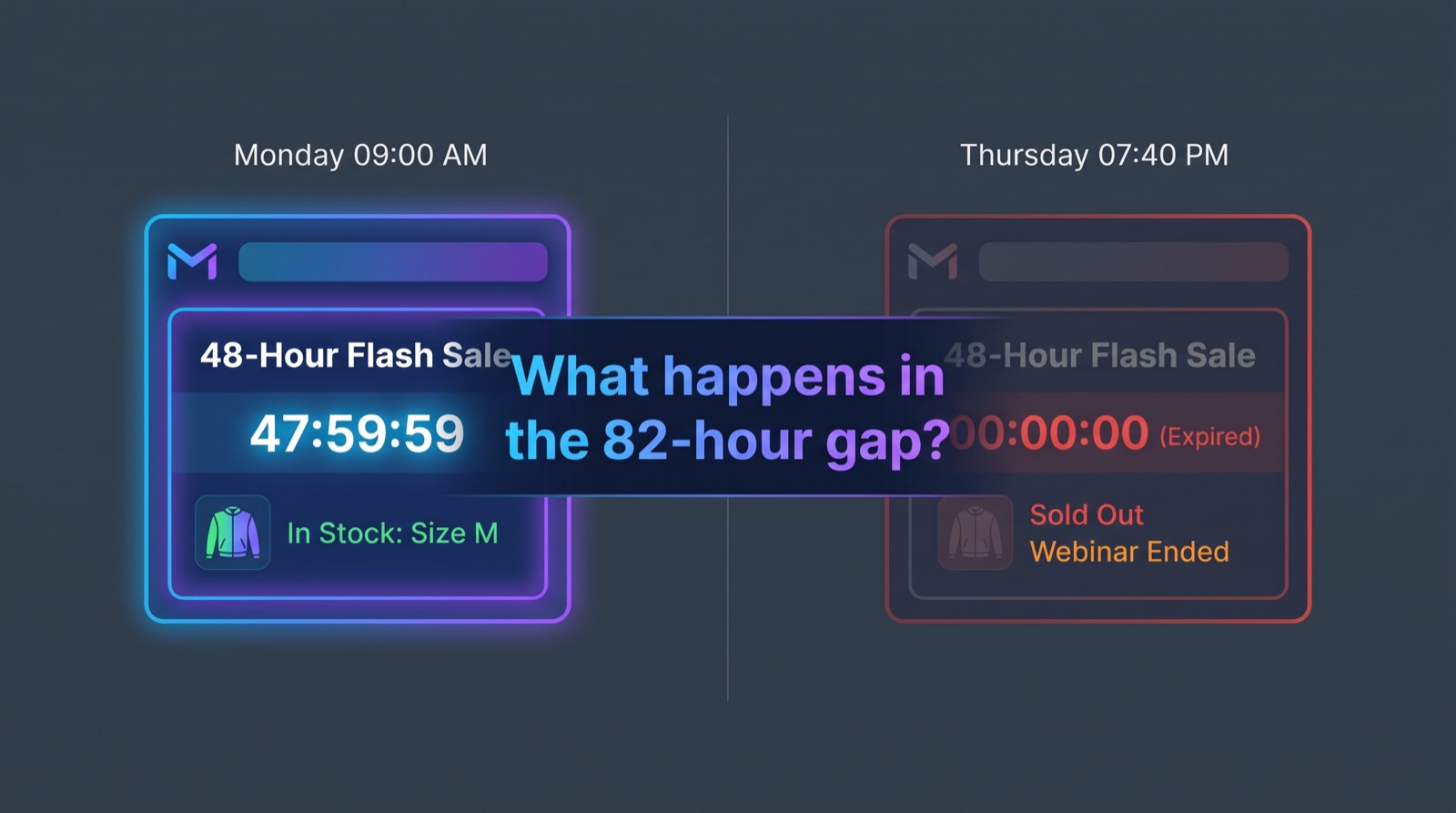
You sent the email at 9:00 on Monday. Your subscriber opens it at 7:40 on Thursday, after the sale has ended, the jacket has sold out in her size and the webinar has already started.
The email doesn't know any of that. It shows exactly what it showed on Monday.
That gap between send and open is where open-time personalization works. Open-time personalization is the practice of deciding part of an email's content at the moment the recipient opens it, rather than at the moment it is sent. In practice that usually means an image whose URL is fixed when the email is sent, while the picture behind that URL is generated fresh each time it is requested. It is a subset of dynamic email content. Most dynamic email content is assembled once, at send. Open-time content keeps updating after that.
The problem has a name: content decay
Every email starts to go stale once it leaves your ESP. You can call that content decay. A price in the hero block is correct at send and wrong by the time of the next promotion. "Only 3 left" is true for an hour. A forecast-driven subject line ("Rain this weekend? We've got you") reads oddly to someone who opens it in sunshine on Sunday. An event email says "starting soon" to someone who opens it during the Q&A.
None of this is a failure of segmentation or copywriting. The content was accurate when it was decided. It was decided too early.
Most email marketers already feel this problem. Fewer have a name for the fix, partly because vendors describe it in different ways: "live content", "real-time email content", "open-time content", "contextual" or "moment-of-open" personalization. They all describe the same mechanism.
Send-time vs. open-time personalization
Send-time personalization is what most ESPs do by default. Merge tags such as *|FNAME|* or {{first_name}}, conditional blocks and dynamic content rules are evaluated when the message is built for each recipient. The result is written into the HTML and delivered. After that, it's static.
Open-time personalization leaves one or more slots unresolved. The HTML contains a reference, normally an <img> tag pointing at a URL, and the content behind that reference is generated when the email client asks for it.
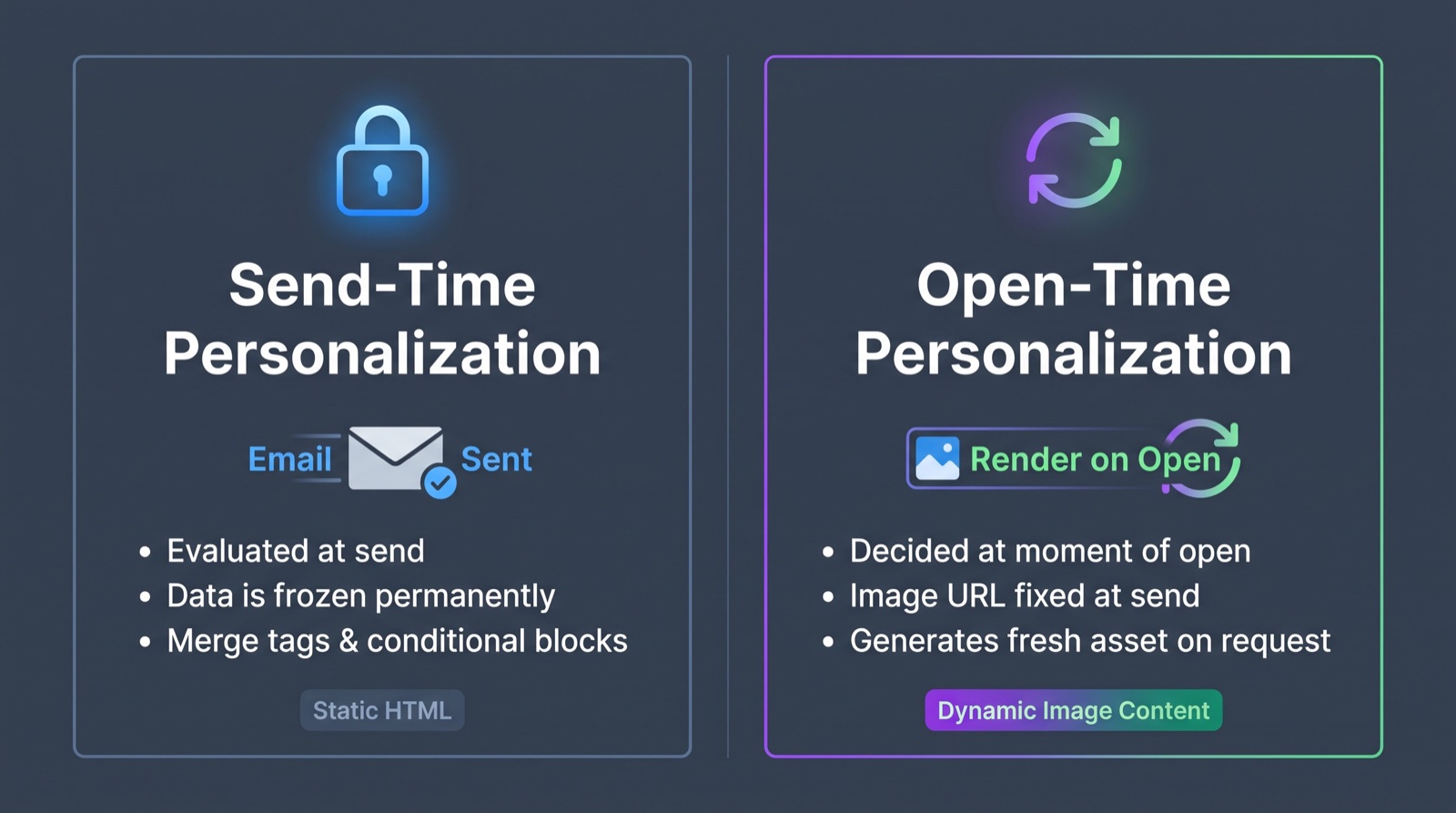
| Send-time personalization | Open-time personalization | |
|---|---|---|
| When content is decided | When the ESP builds and sends the message | When the email client requests the content, usually on open |
| Where the logic runs | Inside the ESP | On an external image/content server, often behind a CDN |
| Typical mechanism | Merge tags, conditional blocks, send-time API calls | Image URL that returns a freshly rendered image |
| Data it can use | Profile and segment data available at send | Data that is current when the image is requested: time, stock, prices, scores, status |
| What it can't do | Reflect anything that changes after send | Change live HTML text or links in the body |
| ESP dependency | Specific to the ESP's template language | Works in any ESP that can send an <img> tag |
Some platforms that look as if they work at open actually work at send. Braze's Connected Content, for example, calls an external API while the message is being rendered for sending and writes the response into the email. That makes it send-time personalization fed by live data at send, not open-time content. Mailchimp merge tags and conditional content, Twilio SendGrid dynamic templates and Adobe Marketo dynamic content are all resolved at send as well.
Other vendors build open-time behaviour into their products. Salesforce positions Einstein Content Selection in Marketing Cloud as an open-time tool: it selects which asset to show when the email is opened. Specialists such as Movable Ink built their category on open-time image rendering, and Marketo users often reach open-time content through that kind of integration.
Not the same as "personalized send time"
Search for "open time personalization" and you'll also find articles on send-time optimization: sending each recipient the email at the hour they are most likely to open it. Zoho and others use the term this way. That is about when the email arrives. Open-time personalization is about what the email shows when it is read. The two work well together, but they solve different problems.
How open-time content works
The mechanism is old and simple. That's why it works across ESPs.
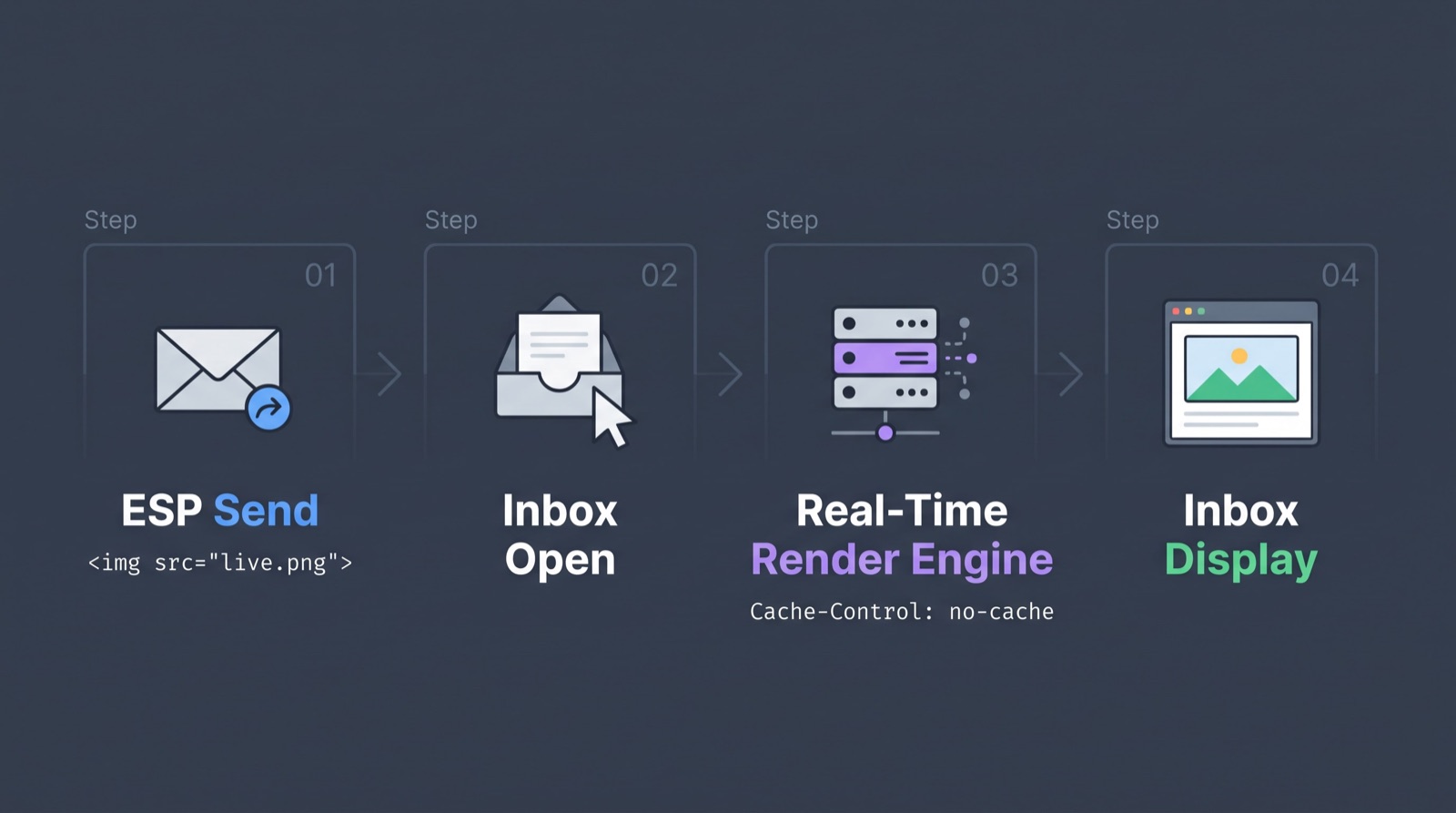
- The email contains an image tag. Its
srcpoints to a content server instead of a static file, for examplehttps://img.example.com/stock/sku-4411.png?r=*|UNIQID|*. - The client requests the image when it renders the email. That might be your recipient's mail app, or a proxy acting for it (see below).
- The server renders the image at request time. It reads the current time, inventory, price, score or status and draws a PNG or GIF.
- The response tells caches not to keep it. Headers such as
Cache-Control: no-cache, no-store, must-revalidateask intermediaries to fetch again rather than reuse an old copy. - Personalization comes from the URL. Merge tags in the query string (a recipient ID, a locale, a product ID) are filled at send. That gives each recipient a distinct URL, which also helps prevent one person's image being served to another from a shared cache.
So open-time personalization still relies on send-time data. The ESP fills in which image; the server decides what's in it at open.
Two techniques do most of the work against stale caches:
- Cache-control headers: they tell browsers, proxies and CDNs that the image expires immediately.
- Unique or cache-busted URLs: they make sure no two recipients, and ideally no two sends, share a cached object.
Neither is a guarantee. Each client and proxy decides for itself what to cache.
What can change at open
Anything you can draw as an image and recompute on request. In practice that includes:
- Time-based content: an email countdown timer to a deadline, "opens in 3 days" vs. "live now" event status, or offers that swap once they expire.
- Inventory and price: stock levels, current price, "back in stock" states.
- Live data visualised: charts of account usage, fundraising progress, poll-style tallies from your own data, leaderboards.
- Context: weather or local information, with an important location caveat covered below.
- Personalized images in email: a name, a loyalty balance or a product rendered into the artwork itself, drawn from a per-recipient URL.
Countdowns in real campaigns
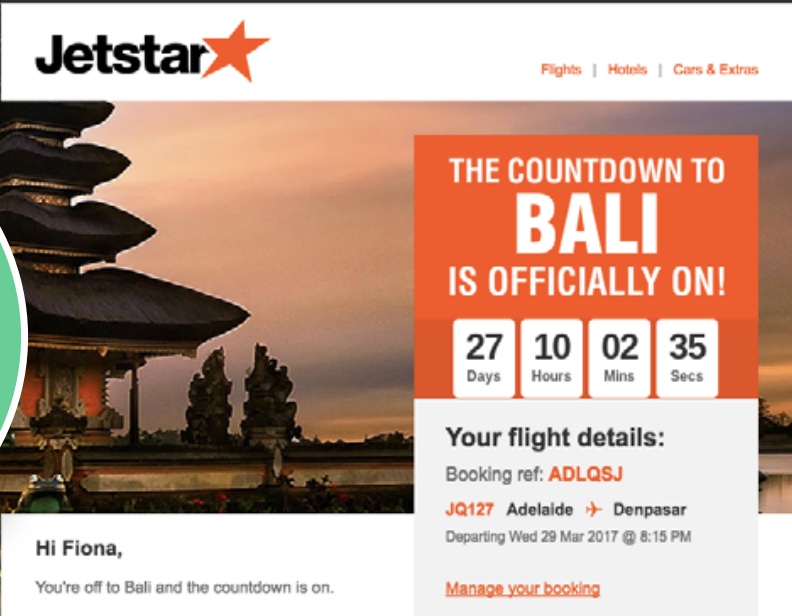
Jetstar used an open-time countdown in its Bali campaign to keep the offer deadline accurate for every recipient, no matter when they opened the email. The timer is a live image rendered at request time, so a subscriber opening the message days after it was sent sees the remaining time rather than the value that was correct at send.
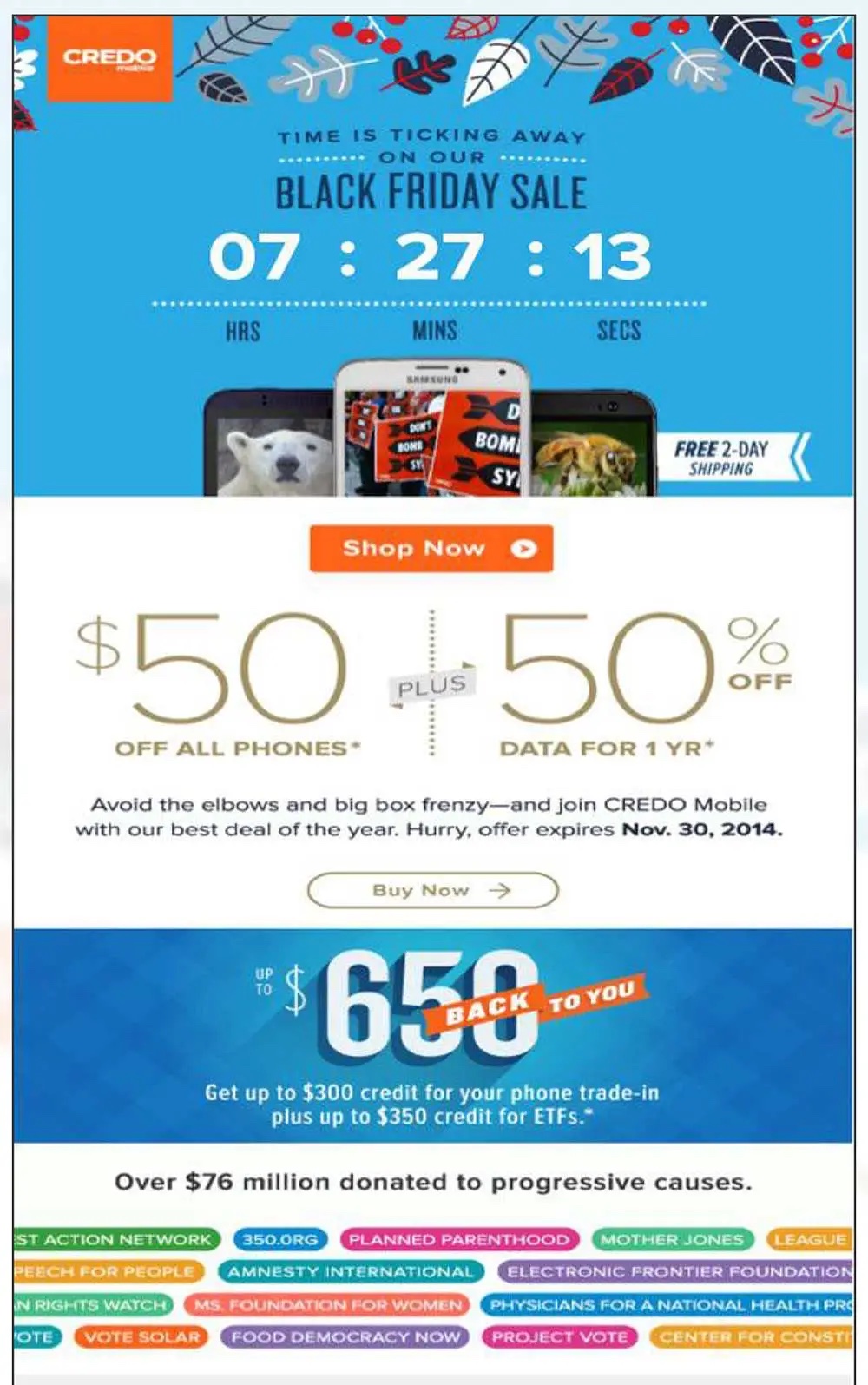
CREDO Mobile's Black Friday email used a countdown timer to make the offer deadline visible at the moment of opening. In an A/B test reported by NiftyImages, the version with the countdown achieved a 14% higher click rate than the version without one.
What it can't change: the HTML around the image. Your subject line, preheader, body copy and link URLs are fixed at send. An image can say "sold out"; the button under it still goes where it went on Monday. Good open-time design keeps the surrounding copy true in every state the image might show.
Apple Mail Privacy Protection: correcting the myth
When Apple launched Mail Privacy Protection with iOS 15, iPadOS 15 and macOS Monterey in 2021, a claim spread quickly: MPP breaks live email content, so countdown timers and dynamic images in email are dead for Apple Mail users.
That overstates it. Here is what Apple documents, and what it doesn't.
What Apple says. MPP hides the user's IP address and downloads remote content privately in the background when a message is received, rather than when it is viewed. Apple also says the hidden IP means senders can't use it to determine the user's location or link it to other online activity.
What follows from that. For users with MPP turned on, Apple requests your image when the message arrives, before any human sees it. Three consequences matter for open-time content:
- Open signals from Apple Mail aren't reliable. An image request doesn't mean a person opened the email. Anything that treats "image requested" as "opened" (open-triggered logic, "first opened at" timestamps) needs another signal for these users.
- Content may reflect delivery, not the open. Apple doesn't document whether the image is requested again when the recipient actually opens the message, and industry tests have reported conflicting results. Assume the rendered state may reflect delivery-time data, and check your own image-server logs.
- IP-based location stops working. Weather or "nearest store" content that relies on an IP lookup may be wrong for Apple Mail users. Location taken from profile data at send (a stored city or postcode passed in the URL) isn't affected.
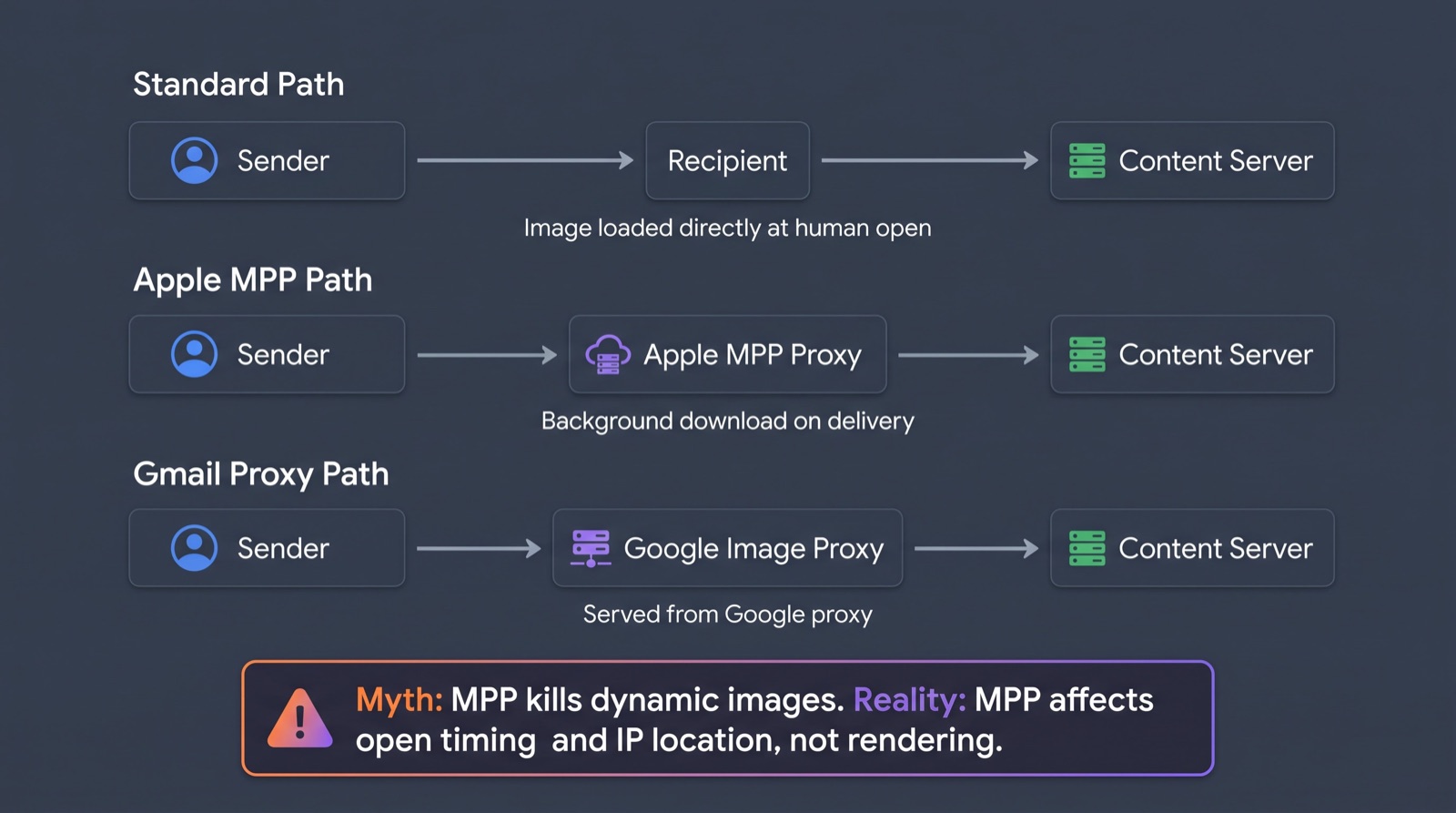
The accurate picture. MPP doesn't stop open-time images from being requested, rendered or shown; Apple loads remote content by design. What it removes is certainty about when the image is requested and whether a person is behind the request. Content that stays correct whether it renders at delivery or at open (a deadline also written as a date, a stock image that degrades gracefully) is robust to MPP. Content that only makes sense at the exact moment of a human open, or that depends on IP location, needs a fallback plan.
Gmail, Outlook and other proxies
Gmail. Since December 2013, Gmail has served images through Google's own proxy servers instead of loading them from the sender's host. Requests typically carry a GoogleImageProxy user agent. Google doesn't publicly document how the proxy handles Cache-Control headers, or whether it requests an image again at every open. No-cache headers and recipient-specific URLs are still the right defence; they just aren't a guarantee.
Outlook. Classic Outlook for Windows blocks automatic download of external pictures by default, unless the sender is trusted or the recipient chooses to download them. Until then, your live image is a blank box with alt text. Outlook for Mac, Outlook.com and the new Outlook have their own image settings, so test the versions your audience uses.
Everyone with images off. Some recipients and corporate environments turn images off entirely. Open-time content is image content, so it inherits every images-off weakness of email.
Where AMP for Email fits
People searching "what is dynamic email content in Gmail" usually mean AMP for Email: Gmail's "dynamic email" feature, where the message itself contains interactive components that can fetch fresh data.
It is a different mechanism with different limits. Senders authenticate with SPF, DKIM and DMARC, register with each provider that supports AMP, and include an HTML fallback that recipients in other clients see instead. Support remains limited to a small set of providers, currently including Gmail, Yahoo Mail, AOL Mail, Mail.ru and FairEmail.
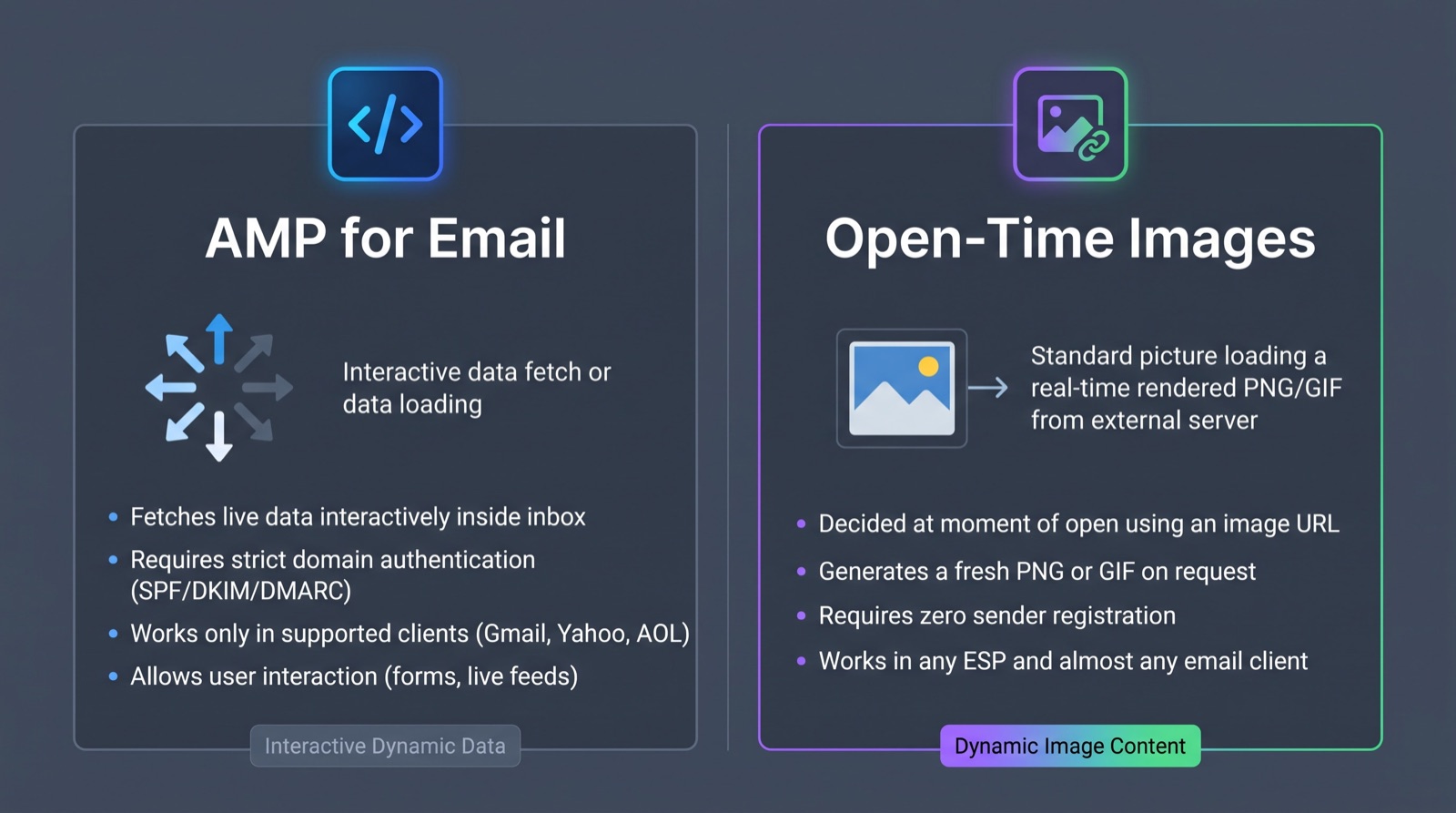
Open-time images need no registration and render wherever images render.
Limitations and good practice
Open-time content is only as good as its worst rendering. Build for that case first.
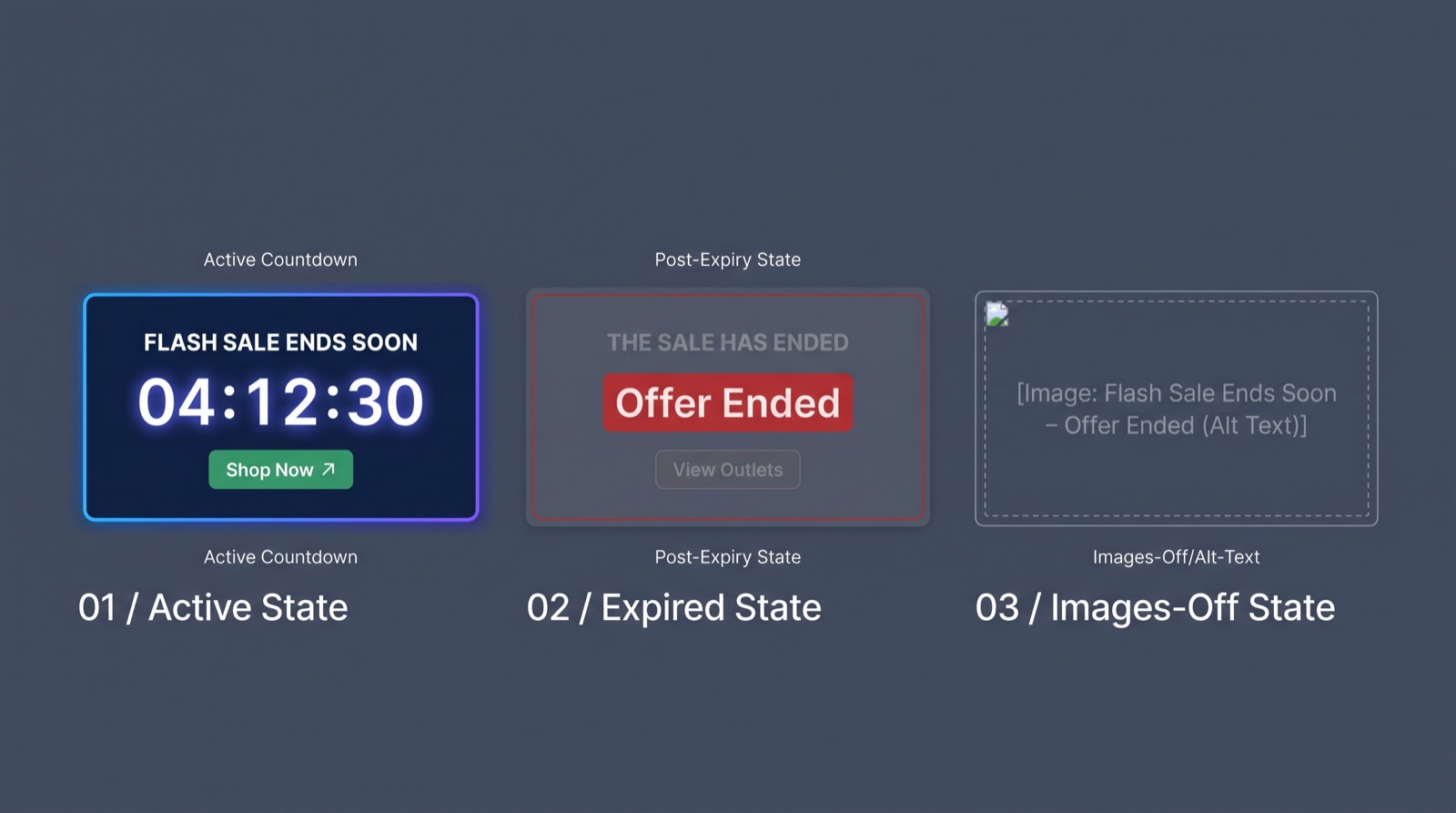
- Write alt text that stands alone. "Sale ends Friday 23:59 CET" is better alt text than "countdown timer".
- Keep the HTML truthful in every state. If the image might show "sold out", the copy around it shouldn't promise availability.
- Put fixed facts in text. Deadlines, dates and prices that matter legally or commercially belong in live HTML text too, not only in the image.
- Design an expired state. Every time-bound image needs a sensible "after" image instead of a frozen 00:00:00 or a broken link.
- Don't geolocate by IP for Apple Mail users. Use stored location data passed in the URL where you can.
- Don't treat image requests as opens. Proxies and prefetching mean they aren't.
- Set cache headers and unique URLs. Both, not either.
- Size and speed matter. The image is rendered on request, so server and CDN latency show up as a slow-loading block.
- Test across Apple Mail with MPP on, Gmail web and app, and both classic and new Outlook. Tools such as Litmus show rendering; they won't show whether a proxy re-requested, so check your server logs too.
Where Dynamo fits
Dynamo provides live open-time blocks for email: images that render when the email is opened and work in any ESP, because each block is just an image URL you place in your template.
The Countdown block is the simplest place to start: set a deadline, style the timer and paste one URL into your template. See all Dynamo tools.
FAQ
What is open-time personalization?
Open-time personalization means deciding part of an email's content when it is opened rather than when it is sent. The email carries an image URL fixed at send; a server renders the image on request using current data such as time, stock or prices. It complements send-time personalization rather than replacing it.
What is dynamic email content?
Dynamic email content is any part of an email that changes by recipient or context instead of being identical for everyone. Most of it is resolved at send through merge tags and conditional blocks. A subset, open-time content, keeps updating after send because it is generated each time the email client requests it.
What is dynamic email content in Gmail?
In Gmail, "dynamic email" usually refers to AMP for Email: messages with interactive components that can load fresh data inside the inbox. Senders register with Gmail as an AMP sender, authenticate their domain and include an HTML fallback; other AMP-capable providers run their own registration. Open-time images are a separate, simpler technique that works in Gmail and most other clients.
Does Apple Mail Privacy Protection break countdown timers and live images?
No. Apple loads remote content through its own proxy, typically in the background when the message is received, so images are still requested and shown. What Apple doesn't document is whether the image is requested again when the recipient actually opens the email. Assume the rendered state may reflect delivery-time data, and check your image-server logs.
What's the difference between send-time and open-time personalization?
Send-time personalization fills in content when the ESP builds the message, using data available then; after delivery it doesn't change. Open-time personalization leaves an image slot to be filled when the email is opened, so it can reflect time, inventory, prices or status at that moment.
Is open-time personalization the same as send-time optimization?
No. Send-time optimization chooses when each recipient receives an email, based on when they usually engage. Open-time personalization changes what the email shows when it is read. One controls arrival time; the other controls content. Many teams use both.
How do you keep dynamic images in email from being cached?
Serve images with no-cache headers such as Cache-Control: no-cache, no-store, must-revalidate, and give each recipient a unique URL, usually by adding a merge-tag ID to the query string. No header guarantees a fresh fetch, because each proxy decides for itself, so test in Apple Mail, Gmail and Outlook.